988 is a suicide and crisis lifeline which is available 24/7.
STEPS TO CONFERENCE CALL WITH 988
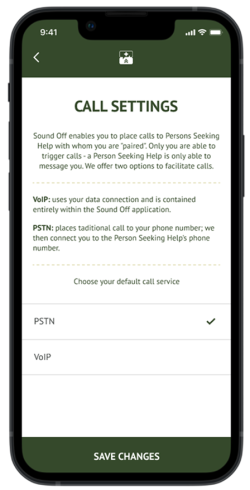
The actions you take to conference call with 988 change based on the type of call you are using (PSTN or VOIP). Your calls by default are set as VoIP. You can go to Settings → Call Settings to view what your calls are set up as.
Please Select the Type Of Call You Are Currently Using:
VOIP CALL
When you are using a VoIP call:
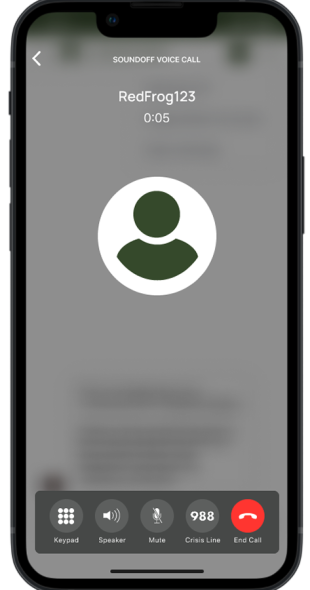
Hit the new 988 button on your call screen:
When you’re in a VoIP call, the 988 button is available for you on your phone screen. When you select this while on a call with a Person Seeking Help, you will both be on a conference call with the 988 Crisis Line.
PSTN CALL
You can use your phone’s three-way call functionality to conference call in 988 so you can stay on the line while your Person Seeking Help(PSH) calls.
Before starting this process, you should let the PSH know that your call with them will be ON HOLD while you add 988
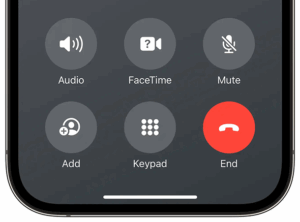
First of all, click on the “Add” button on your call screen with the PSH.
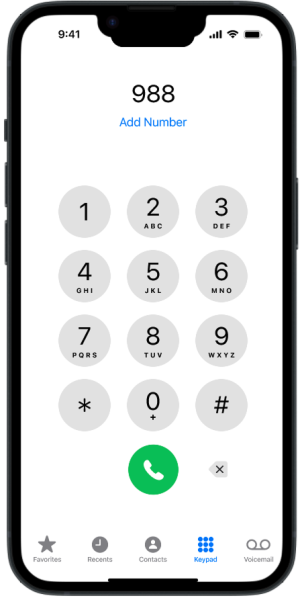
2. Open your keyboard and call 988.
3. After the 988 call starts, you can click on “Merge Calls” to start your conference.
From this point on, you, the 988 crisis line, and the PSH will all be on the same line.